
- Use Case: 5-8-02
- Completed By: Software Developer
- Estimated Completion Time: <5 days
Basic Scenario
You must regularly retrieve the set of failed Transactions processed by Vindicia Retain, typically on a daily basis. You retrieve the final statuses of the Transactions that you submitted the day before. You must retrieve the processing results one page at a time, until no results are returned on a page.Design Approach
- You must use the Vindicia Retain
fetchBillingResultsmethod to retrieve results from Vindicia Retain Processing each day after 6am EDT (3am PDT). Immediately after you retrieve results, you can submit the set of new Transactions to Vindicia Retain. Daily cutoff for submitting transactions is 12pm EDT (9am PDT). - You retrieve the results of the current day’s submission the following morning.
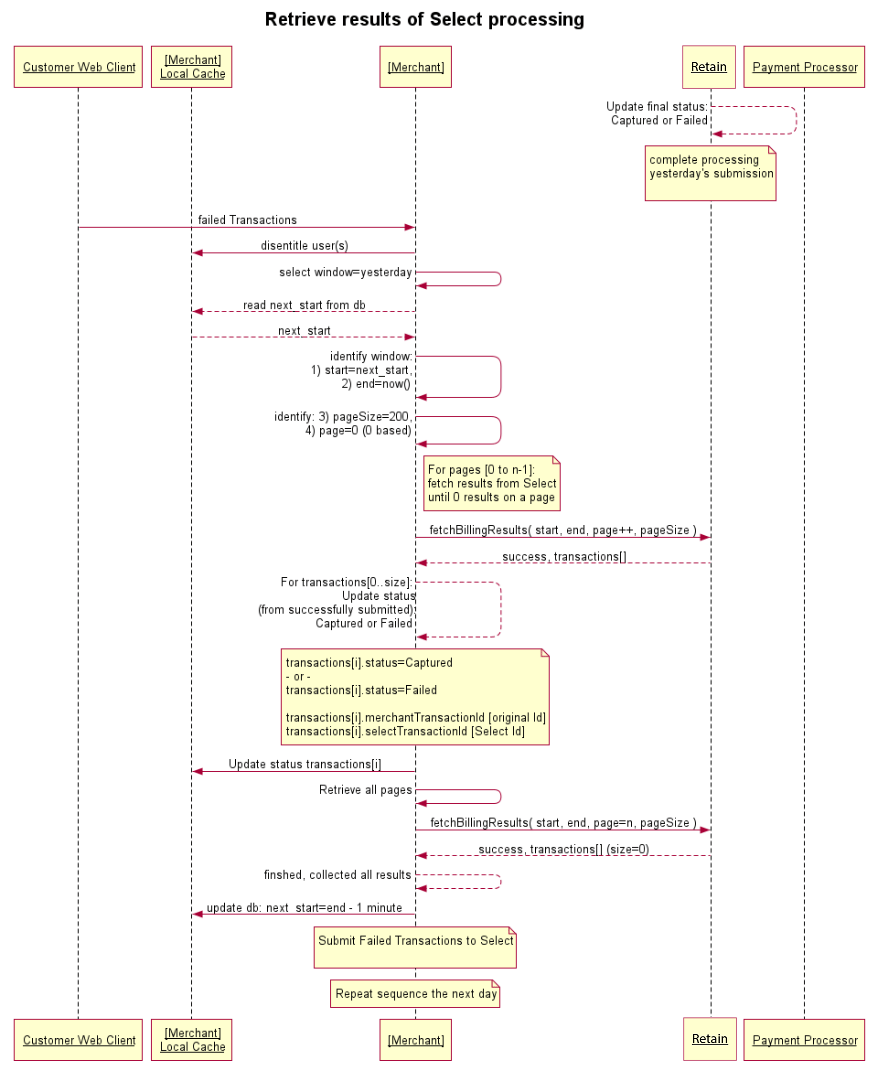
Use Case Implementation
As shown in the following diagram, you must callVindicia.Soap.Select.fetchBillingResults to retrieve the results of Vindicia Retain Processing.
Vindicia.Soap.Select.fetchBillingResults accepts a start and end time that defines the time window of processing results to retrieve from the previous day’s submission of failed Transactions to billTransactions.
As Vindicia Retain batches are processed once per day, the time interval during which changes are reported is 24 hours. Vindicia recommends that you choose a similar time each day to invoke the retrieval process, usually in the morning. (It is acceptable to choose a time interval shorter than 24 hours, but in that case you must invoke the retrieval process more times within the day to ensure complete coverage of the full time window, as the time the final status is determined varies throughout the day.)
Given that the call to Vindicia.Soap.Select.fetchBillingResults is a paged call, select an appropriate pageSize to keep the response size and resulting response time down to a manageable value. For this purpose, a pageSize of 200-500 is reasonable, based on the total number of Transactions to be retrieved and the daily submission volume.
The initial call to fetchBillingResults using the start and end timestamps performs the initial query which is cached from the database, and therefore typically takes the most time to respond. Each call to fetchBillingResults on subsequent pages using the identical start and end timestamps (saved in variables initially) accesses the cached database query results, pulls out the results for the requested page, and returns that page of results. When no results are returned on a requested page, the loop of paged calls completes and all results are retrieved.
As the initial call to fetchBillingResults (for page 0) performs the database query and causes the query results to be cached, you can repeat this call on a timeout. The second time the same call comes in, the cached results may be available and returned without a timeout. For this reason, if any timeouts are experienced in the fetchBillingResults call for any page, you can resubmit the same call.
Note that for timeouts due to the pageSize used, you can recover them only by reducing the pageSize or by increasing the local timeout. You can recover timeouts due to the query duration by a simple resubmission. The query results are cached from the initial call, and that query will likely have completed by the time the resubmission occurs.
Each Transaction returned contains:
- The value of
merchantTransactionId, corresponding to the unique merchant identifier of the original failed Transaction. - A value in
selectTransactionId, which is the unique identifier for the Vindicia Retain Transaction corresponding to the reprocessing of the Transaction, assigned by Vindicia Retain and sent to the Payment Processor for the final attempt. The value returned inselectTransactionIdis sent to the Payment Processor in reverse order. When viewing any Transactions in the Payment Processor Online access, the Retain Transaction can be identified by first reversing the value ofselectTransactionIdand then providing it to the Payment Processor in an Order Number or other field. For example, forselectTransactionId=ABC123456,654321CBAis sent to the Payment Processor. - The final status for the Vindicia Retain Transaction is returned for each Transaction in the
statusfield, and will be eitherCapturedorFailed, depending on whether Vindicia Retain was able to recover the Transaction or not.
Performance and Concurrency
For most cases, even with sufficiently high daily volume, a single thread or process using a single sequential loop is typically satisfactory for overall completion time. This is because the call tofetchBillingResults is a batched call that runs only once per day to pick up results of the prior day’s Vindicia Retain processing. If you deem this too restrictive based on other timing constraints, you can request each page on different threads simultaneously, after the initial call to fetch page 0 has successfully completed, up to a maximum of 10 simultaneous calls to fetchBillingResults. Exceeding the limit on maximum concurrency results in a 503 error being returned.
Between each call to fetchBillingResults on each thread (or in the main process/single thread), insert a short delay to allow the prior call to completely release the resource handle to Vindicia Retain, so the Concurrency for that thread is released.
References
- For more information about working with the Vindicia Retain API, see the Vindicia Retain API Guide.
-
For detailed information about the
fetchBillingResultsmethod, see Select.fetchBillingResults. in the Vindicia Retain API Guide. - Retrieve Processing Results Using the Retain APIs
Retrieve Processing Results Using the Retain APIs
Submit failed transactions to Retain (see Submit Failed Transactions to Retain for Recovery.) Note the following:- Completed by: Software developer
Select.fetchBillingResults :
-
Initialize the start time once:
Save the variable
next_startin your database, as it will be used and updated each day. -
Once per day (preferably the same time each day), invoke the following code:
-
The parameters
page, andpageSizewill incrementpagein the loop;pageSizeis a tuning parameter: -
Loop through each page, using the same start and end times for efficiency in the query time:
-
Update the start time for the next call (to be used in the following day’s execution):
-
The parameters
-
Execute the code in Step 2 the next day and every day, so the time window includes all calls to
billTransactionssubmitted on the prior day and the results for all Transactions submitted. -
Submit the current day’s failed Transactions to Vindicia Retain for processing. See Submit Failed Transactions to Retain for Recovery.
Sample Code
Note that client libraries are not provided for Vindicia Retain. The WSDL endpoint is used by the development environment to generate a library that you can use, or you can use direct WSDL posts to submit requests to Vindicia Retain.
This sample was built against a Java library that was generated using the Axis wsdl2java utility against the WSDL endpoint shown.
To run this sample, you must first generate the Java library:
https://github.com/Vindicia/CashBoxAPISamples/tree/master/Select/Java/FetchSelect
Error Handling
The error
503 User Over Global Capacityindicates that the number of simultaneous calls to Vindicia Retain (usingbillTransactionsandfetchBillingResults) has exceeded the maximum allowed Concurrency limit. To address this error code, introduce a short delay between sequential calls to give time for that connection to be released to the pool, and/or reduce the number of running threads that are making calls to Vindicia Retain. If a timeout occurs on page 0, you can resubmit the same request after a short delay. The results are then returned in a much shorter timeframe due to the cached results available. For timeouts on any other page after the first, it is likely that thepageSizeis too large, or that the local timeout is too short. However, you can resubmit the same request on timeout. As long as another timeout does not occur, the same information is returned. This can be treated the same as no error, and the full date including all of the previous day’s Vindicia Retain results are returned when the full loop of pages is completed, until 0 results are returned. Certification Provide the Solution Architect with SOAP IDs from two calls tofetchBillingResultsfrom a single loop execution for review:- SOAP ID #1: one for the first page (that is, page 0)
- SOAP ID #2: for the final page in the loop (with 0 results returned)