
- Use Case: 5-8-01
- Completed By: Software Developer
- Estimated Completion Time: <5 days
Basic Scenario
You must regularly collect the set of failed Transactions, typically on a daily basis. You then break up the set of failed Transactions into a number of fixed sized pages, and submit each page to Vindicia Retain in a loop. Vindicia Retain then processes the failed Transactions to recover lost revenue. The following day, you must retrieve the results of the Vindicia Retain processing. For information about retrieving the results of Vindicia Retain Processing of failed Transactions, see Retrieve Results of Retain Processing.Design Approach
You must submit transactions to Vindicia Retain using thebillTransactions method, sometime after 6am EDT (3am PDT). Daily cutoff for submitting transactions using billTransactions is 12pm EDT (9am PDT).
Provide as much information as possible about the originally failed Transaction to allow Vindicia Retain the best opportunity to recover the Transaction. Specifically, pass your original merchant Transaction ID in the merchantTransactionId data member on the Transaction object, and pass your merchant Subscription ID in subscriptionId.
Also pass the following additional data members:
previousBillingDatepreviousBillingCountcustomerIdcreditCardAccountcreditCardExpirationDatebillingAddressauthCode,avsCode, andcvnCode(theauth,avs, andcvnresult values for the original failed Transaction)
merchantTransactionId that you provide. Any duplicate submissions that specify the same value for merchantTransactionId are not processed.
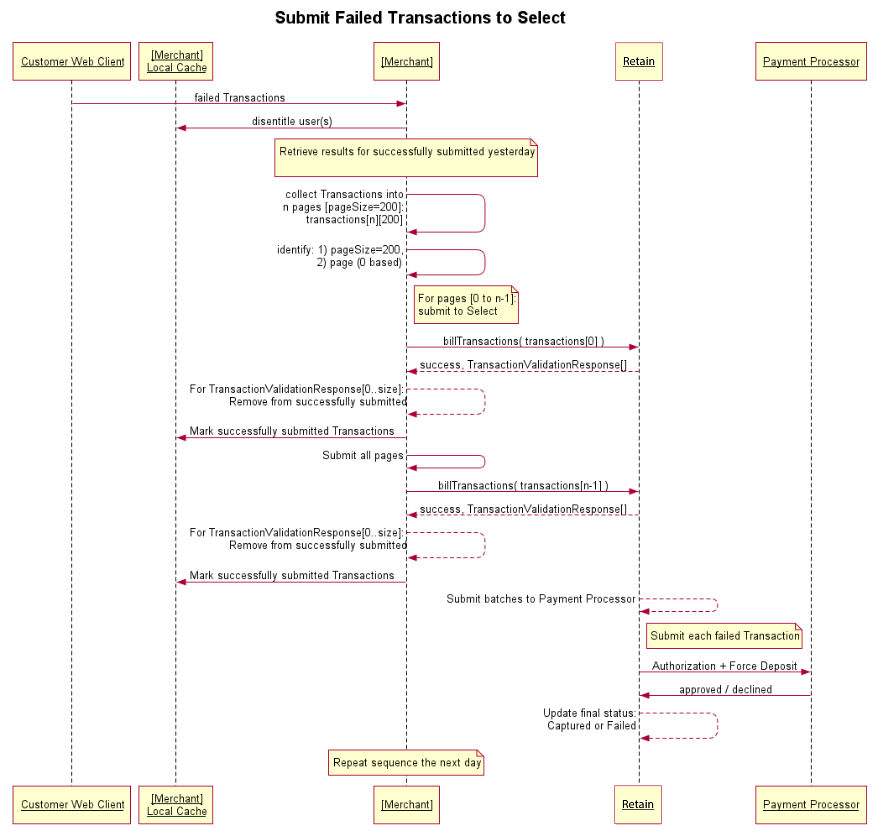
As shown in the following diagram, the sequence for submitting failed Transactions is as follows:
-
For the total number of failed Transactions to be submitted in one day, divide the Transactions into separate pages of 200 Transactions each, and submit each page in a separate call to
billTransactions. -
Use the Vindicia Retain
billTransactionsmethod to submit a failed Transaction. This method accepts an array of Transactions representing the failed Transactions in your merchant system. Treat this call as a paged call, to reduce the bandwidth used and resulting timeout period required for a response. Each Transaction submitted adds about 1 second to the response time. Therefore, the recommended pageSize is 200 so that the overall response time remains within 200 seconds. The merchant SOAP client timeout must be longer than 200 seconds to avoid timeouts from occurring. In all cases, the pageSize must be less than 1000, to allow the log information to be viewable by Vindicia without truncation. -
After a call to
billTransactionshas returned successfully, inspect the returnedTransactionValidationResponsearray, if any. Each element in this array indicates that the submission of the referenced Transaction was not successful, and the Transaction is therefore not processed by Vindicia Retain. Remove each such Transaction from the list of successfully submitted Transactions to Vindicia Retain. No response for these Transactions will be returned the next day when you retrieve the results of Vindicia Retain Processing. (For that reason, you can resubmit the same call tobillTransactionsif you do not know what the original result of the submission had been.) -
Between each call to
billTransactionson each thread (or in the main process/single thread), insert a short delay to allow the prior call to completely release the resource handle to Vindicia Retain, so the Concurrency for that thread is released.
References
- For more information about working with the Vindicia Retain APIs, see the Vindicia Retain API Guide.
- For detailed information about the billTransactions method, see Select.billTransactions in the Vindicia Retain API Guide.
- Submit Failed Transactions Using the Retain APIs
Submit Failed Transactions Using the Retain APIs
Fetch the results of the previous day’s Vindicia Retain processing (see Retrieve Results of Retain Processing). Note the following:- Completed by: Software developer
-
Collect the Failed Transactions into pages of 200 each:
-
Submit the failed Transactions to Vindicia Retain using the
billTransactionsmethod. Once per day (preferably the same time each day), invoke the following code:-
The parameters
pageandpageSizewill incrementpagein the loop;pageSizeis a tuning parameter:Note: Since the Transactions are in separate pages, you can submit each page on different threads simultaneously, up to a maximum of 10 simultaneous calls tobillTransactions. (Exceeding the limit on maximum concurrency results in a 503 error returned frombillTransactions.) -
Loop through each page:
- Execute the code in Steps a. and b. the following day and every day. Sample Code Note that client libraries are not provided for Vindicia Retain. The WSDL endpoint is used by the development environment to generate a library that you can use, or you can use direct WSDL posts to submit requests to Vindicia Retain. This sample was built against a Java library that was generated using the Axis wsdl2java utility against the WSDL endpoint shown. To run this sample you must to first generate the Java library: https://github.com/Vindicia/CashBoxAPISamples/tree/master/Select/Java/BillSelect
-
The parameters
-
If it is not clear whether a Transaction was successfully submitted to Vindicia Retain, for example due to timeout, you can resubmit the same
billTransactionscall again and observe theTransactionValidationResponsearray returned:- Transactions that were submitted successfully on a prior call return a
400 Duplicate, which you can interpret as successfully submitted. - Transactions that were not previously submitted successfully (either due to timeout or due to a previous 503 error) return a result only if it is an error (successful submission of an individual Transaction does not generate a
TransactionValidationResponsearray element). Error Handling
TransactionValidationResponsearray elements: - Transactions that were submitted successfully on a prior call return a
Provide the Solution Architect with a SOAP ID from one call to
billTransactions for review.
In the submission, include transactions from a good and a bad card (transactions that result in a final state status of Captured and Cancelled, respectively).
When you implement the Cancel and Refund use cases (RET-006 and RET-007), include a third good card transaction that subsequently can be refunded. When a refund call is made the transaction’s status changes from Captured to Refunded. Include the fetch operation performed for your RET-005 Certification for this Refunded transaction.
To retrieve the results of Vindicia Retain Processing, see Retrieve Results of Retain Processing.
Parent topic:Submit Failed Transactions to Retain for Recovery