
- Use Case Number: 5-8-03
- Completed By: Software Developer
- Estimated Completion Time: <5 days
Basic Scenario
After you submit failed Transactions to Vindicia Retain inbillTransactions, you may determine that processing for one or more of the Transactions must be canceled. Typical reasons to cancel Retain processing include:
- The customer paid through the billing system after the failed Transaction was submitted to Vindicia Retain earlier in the day.
- The customer canceled the subscription and should not be charged.
- You need to address an otherwise incorrect submission to Vindicia Retain.
refundTransactions to submit the set of Transactions to cancel to Vindicia Retain. You can retrieve the results in the next day’s retrieval process. See Retrieve Results of Retain Processing.
Design Approach
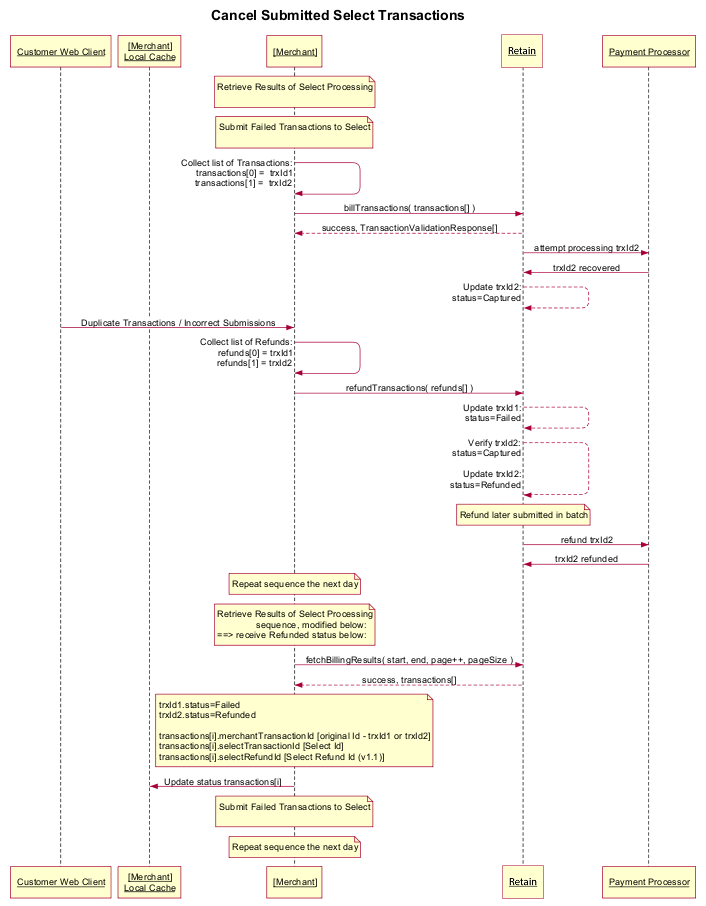
As shown in the following diagram, to cancel a previous request to process one or more failed Transactions frombillTransactions, you must collect and submit the Transactions in a call to refundTransactions. This method accepts an array of Transaction IDs representing the failed Transactions in the merchant system previously submitted to billTransactions.
When you next execute the fetchBillingResults process, the status for the transactions appears as one of the following:
References
- For more information about working with the Vindicia Retain API, see the Vindicia Retain API Guide.
-
For detailed information about the
refundTransactionsmethod, see Select.refundTransactions in the Vindicia Retain API Guide. - Cancel Submitted Transactions Using the Retain APIs
Cancel Submitted Transactions Using the Retain APIs
To cancel submitted Retain Transactions:-
Use the Vindicia Retain
refundTransactionsmethod to cancel the processing of one or more failed Transactions previously submitted tobillTransactions. If a submitted item fails to validate, it will be returned in aTransactionValidationResponsearray element. Sample Code Note that client libraries are not provided for Vindicia Retain. The WSDL endpoint is used by the development environment to generate a library that you can use, or you can use direct WSDL posts to submit requests to Vindicia Retain. The following sample first submits Failed Transactions inbillTransactions, then immediately submits arefundTransactionsrequest: https://github.com/Vindicia/CashBoxAPISamples/blob/master/Select/Python/SEL003CancelSubmittedSelectTransactions.py Certification Provide the Solution Architect with SOAP IDs from a call torefundTransactionsand a corresponding call tofetchBillingResultswhere the updated status of the Failed Transactions sent to therefundTransactionscall were returned for review:- SOAP ID #1: call to
refundTransactionscontaining one or more Transaction IDs previously submitted inbillTransactions. - SOAP ID #2: call to
fetchBillingResultswhich returned the updated status for one or more Transaction IDs from the call in SOAP ID #1.
- SOAP ID #1: call to