
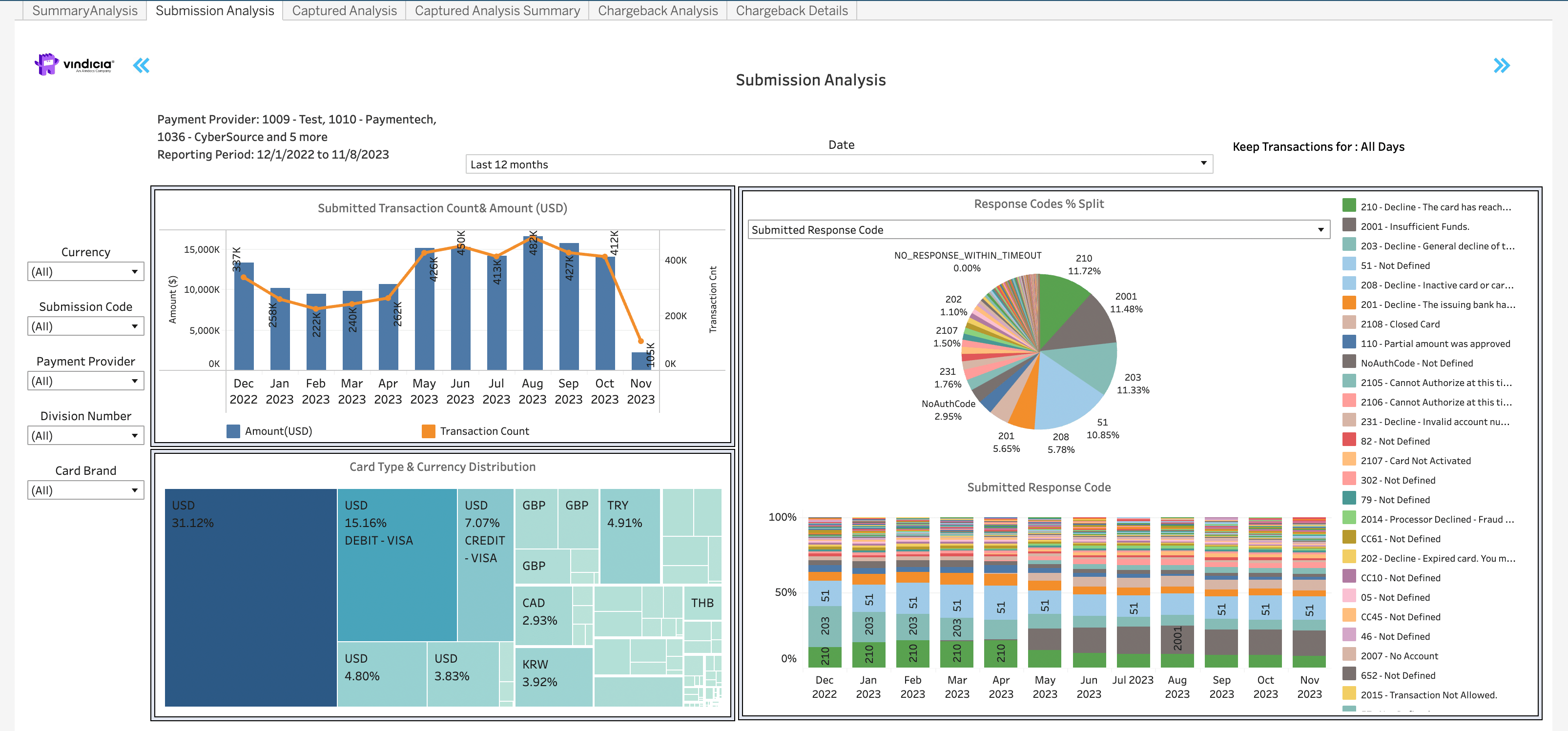
- Submitted Transaction Count and Revenue visual diagram - shows the trends and breakdown of your submitted Transactions and how these fluctuate over time. Can be filtered by the dropdown filters for a deeper dive.
- Submission Codes Percentage Split chart - can be filtered by Submitted Response Code or First Retry Code from the dropdown filter. In the Submitted Response Code view, if you provide the response codes with your submitted Transactions, you can view the distribution of the response codes submitted in general and by month. In the First Retry Code view, you can view the distribution of the response codes on the first retry.
- Card Type and Currency Distribution chart - shows the distribution of the submitted failed Transaction by the card type (brand) and the currency of the Transaction. You can filter your view by limiting the defined period or by selecting which currencies to show. For more details on filtering , see Common Tasks for Using the Dashboards.
Directions
- Hover over any month in the graph to see a pop-up data box with the monthly details.
- Current month displays data up to date 3 days ago. Often this displays partial month revenue and so data may be lower than expected.
- For the success rates, Transactions that were canceled on the same day by the merchant during the retry period are not immediately deducted from the calculation. This implies that the success rate might be potentially higher than displayed.
- For common operations such as period selector and dropdown selectors, see Common Tasks for Using the Dashboards.