
Vindicia Retain Onboarding
Q: What info will I need to share with Vindicia Retain?
A: You will need to share information to allow us to heal your failed transactions and retain your customer relationship. Vindicia Retain represents your failed Transactions by directly integrating with your Payment Provider. We’ll need the necessary data that is required for Transaction processing, such as the data you provide your payment provider when first submitting the Transaction. We’ll also list recommended and optional data that you can provide us. Providing more than the minimal required data will often improve your recovery rates. The required data include data elements such as:- Transaction ID
- Transaction’s amount and currency
- Transaction’s original date and time
- Transaction’s payment method details Note: Vindicia is PCI-DSS Level 1 compliant and can safely receive and store full PAN (Primary Account Number) credit cards details as well as tokenized credit card details.
- Subscription ID
- Authorization response code from your payment provider
- CVN code
- Number of retries you’ve previously performed
Q: How does Vindicia keep my data safe?
A: At the core of its platform, Vindicia’s products are built to safeguard merchants’ financial data, keeping you secure and compliant. We understand that privacy, integrity, and availability of your data is vital to your business. Vindicia has created far-reaching measures to safeguard personal subscriber information against loss, theft, unauthorized access, use, and modification. Our systems receive, vault ,and store all sensitive data in compliance with the following security standards:- PCI-DSS Level 1 compliant
- SOC 1 type 2, SOC 2 Type 2 certified
- SOX compliant
- ISO 27001
- EU GDPR and SCC committed
- California CCPA committed
- Brazilian LGPD committed
Q: How long does it take Vindicia Retain to recover lost payments?
Vindicia applies advanced machine-learning based techniques for recovering your failed payments and extending your customers’ relations with you. The time to recover a failed payment, depends on many different factors:- your unique personalized merchant recovery plan
- the prescribed healing technique for the transaction
- the data you provided to us
- your grace policy
What payment methods can be recovered by Vindicia Retain?
Vindicia Retain works to heal and recover failed payments for all types of cards and card brands. Retain supports credit card, debit cards, and prepaid cards payment methods. Vindicia accepts PAN’s (Primary Account Number) or tokenized cards due to our compliance with the strictest security measures such as PCI-DSS Level 1. If you provide a tokenized card, it is recommended to provide the card BIN as well. For more details on our security support, see Vindicia Security and PCI Compliance.Vindicia IDP and Multi-Factor Authentication
Q: What is Vindicia IDP?
A: Vindicia IDP, is Vindicia’s advanced Identity Provider for merchant user authentication and login to Vindicia’s Merchant Portals. Vindicia IDP is available for Subscribe and Retain merchants for accessing Vindicia Subscribe Merchant Portal and Retain Merchant Portal. Vindicia’s IDP supports all PCI and ISO required security measures such as complex passwords, Multi-Factor Authentication, and the use of unique passwords. It also provides an additional security layer for Vindicia portals, helping to protect against unauthorized access. Merchant users will be responsible for creating their own passwords and defining multiple verification methods in a simple-to-use Identity Provider app. Also, Vindicia IDP will provide admins User Management capabilities for the merchant users, such as disabling and enabling users, resetting passwords, and resetting multi-factor authentication factors. These were previously unavailable for Merchant staff. The creation of new users will still require a request submitted to Vindicia Client Technical Support.How do I use Vindicia IDP?
A: Users will receive an email providing their Vindicia ID (username) and prompting them to the Vindicia Portal via the Vindicia IDP app. Here you’ll set up your password and define multi-factor authentication either via email or via an authenticator app. Learn how to access the Portal with Vindicia IDP. For Multi-Factor Authentication set up, you can use either your email as an identifying factor or an authenticator app, Most authentication Apps are supported. You can use a common one such as MS Authenticator or Google Authenticator. Download the app from your mobile device app store such as Google Play or Apple App store. Once you’ve logged in via Vindicia IDP, you can always access it to change your password and other details. User the link available in your Settings page. For more details, see User Sign In - Vindicia IDP.Q: What is Multi-Factor Authentication (MFA)
A: Multi-Factor Authentication is a secure authentication method requiring identity verification by supplying two or more identifying details (also called factors) when a user logs in. MFA is an effective way to increase protection for user accounts against common threats like phishing attacks, credential stuffing, and account takeovers. It adds another layer of security to the login process by requiring users to enter two or more pieces of evidence — or factors — to prove they’re who they say they are. Typically the first factor is something the user knows, such as their username and password combination. Additional factors are often verification methods that the user has in their possession, such as an authenticator app, a phone number, or security key. A familiar example of MFA, is the two factors needed to withdraw money from an ATM. Your ATM card is something that you possess and your PIN is something you know. By tying user access to multiple, different types of authentication factors, it’s much harder for a bad actor to succeed. For Vindicia IDP, you will use:- Username and password as your first factor- something you know.
- One time code sent to your email or an Authenticator App - something you possess.
Q: Why is Vindicia requiring log in via Vindicia IDP?
A: The global security threat landscape is constantly evolving, and the types of attacks that can cripple a business and exploit consumers data are on the rise. Today it’s more important than ever to implement stronger security measures. Multi-Factor Authentication (MFA) is one of the easiest, most effective tools for enhancing login security, and safeguarding your business and your data against security threats. Vindicia IDP provides Multi-Factor Authentication (MFA), a secure authentication method requiring identity verification by supplying two or more identifying details (also called factors) when a user logs in. The first factor is often a common detail (factor) such as username and password. Additional verification factors can be authentication by an authenticator app, or an email-delivered one-time password. These additional verification factors, provide additional security for user access and make it much harder for scammers using phishing attacks and account takeovers to succeed.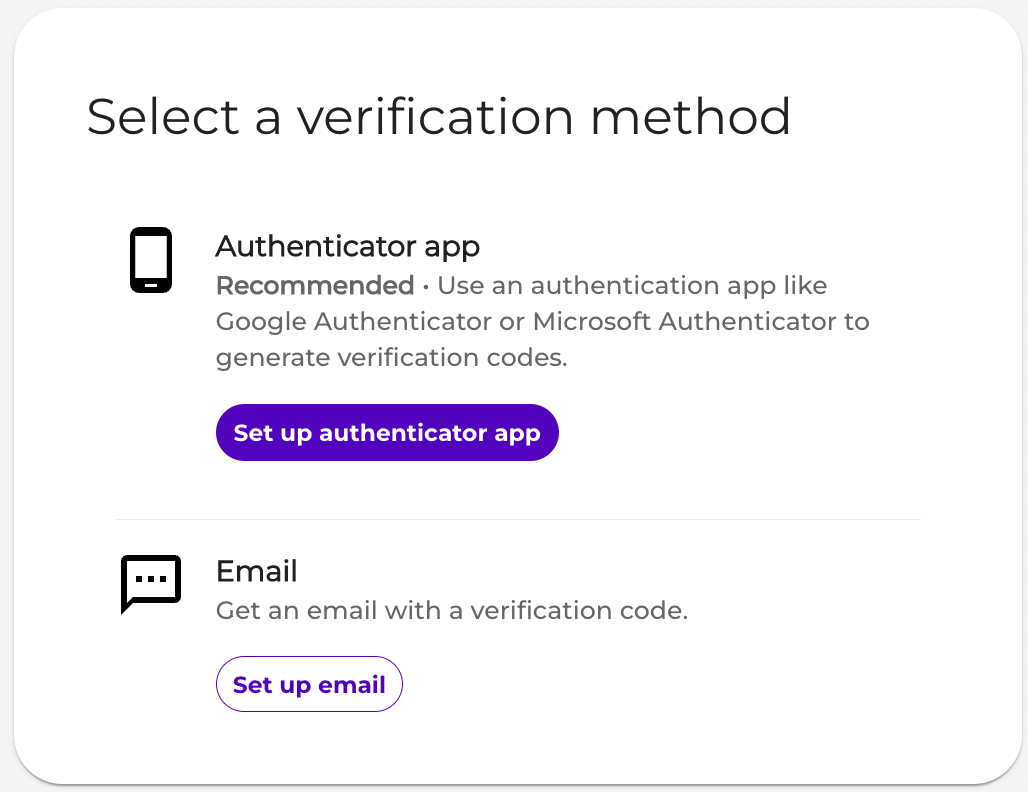
Q: Is Vindicia requiring merchants to enable MFA?
A: Effective April 1, 2023, Vindicia merchants are required to use MFA to access Vindicia Portals. New merchants will be provided access via Vindicia IDP. Existing merchants will be moved over to Vindicia IDP in a phased approach between April and June 2023. Optionally, Merchants already utilizing an OIDC-based Identity Management system enabled with MFA such as OKTA, or Microsoft Azure can request to use their own Identity provider and integrate authentication to Vindicia Portals. To learn more, see Vindicia External User Authentication Requirements.Q: I’m the Admin, How can I manage our other merchant users?
A: Once Vindicia IDP is active for your organization, you, the merchant admin (super user), are able and responsible for managing your users using the new Vindicia IDP Care console. Two versions of Vindicia IDP are now available as follows:- Vindicia IDP Console 1.0 - Offers administrators the ability to manage basic user identity settings for organizational users such as reset password, or reset multi-factor authentication methods.
- Vindicia IDP Console 2.0 - Offers administrators the ability to manage extended user settings such as adding new users, setting roles for users, resetting passwords and more.
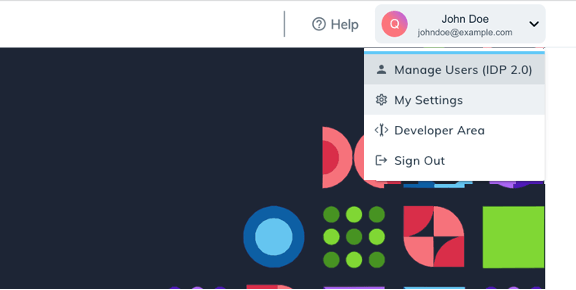
Q: How can I access the Vindicia IDP console?
A: Merchant admins (super users) can access the Vindicia IDP Care console through the Merchant Portal by clicking Manage Users in the top right corner of their screen under their account name.