Vindicia Supported Payment Providers for 3DS

Most current payment providers support 3DS authentication natively. The implementation details may differ slightly, but most follow the EMV 3D Secure Specification from EMVco. In cases where 3DS support is not natively supported by a given payment provider (for example, WorldPay and CyberSource), Vindicia leverages Cardinal Commerce (a Visa solution) specifically for providing an authentication service (for information, see cardinalcommerce.com). Vindicia works with each of our supported providers to allow our merchants to implement 3DS on the Subscribe platform. Vindicia supports the following payment providers with 3DS flows:
  • Barclays SmartPay
  • Braintree
  • Ingenico Global Collect
  • Ingenico Connect
  • CyberSource
  • Chase Paymentech
  • WorldPay
  • Paysafe
  • FCBarca Gateway
Note: There were several versions of 3DS released over time. Vindicia can provide support for any of the 3DS versions. Actual support is based on the payment provider implementation and supported 3DS version.

3DS Process Flow Changes

Steps You Need to Implement

To implement 3DS, you must:
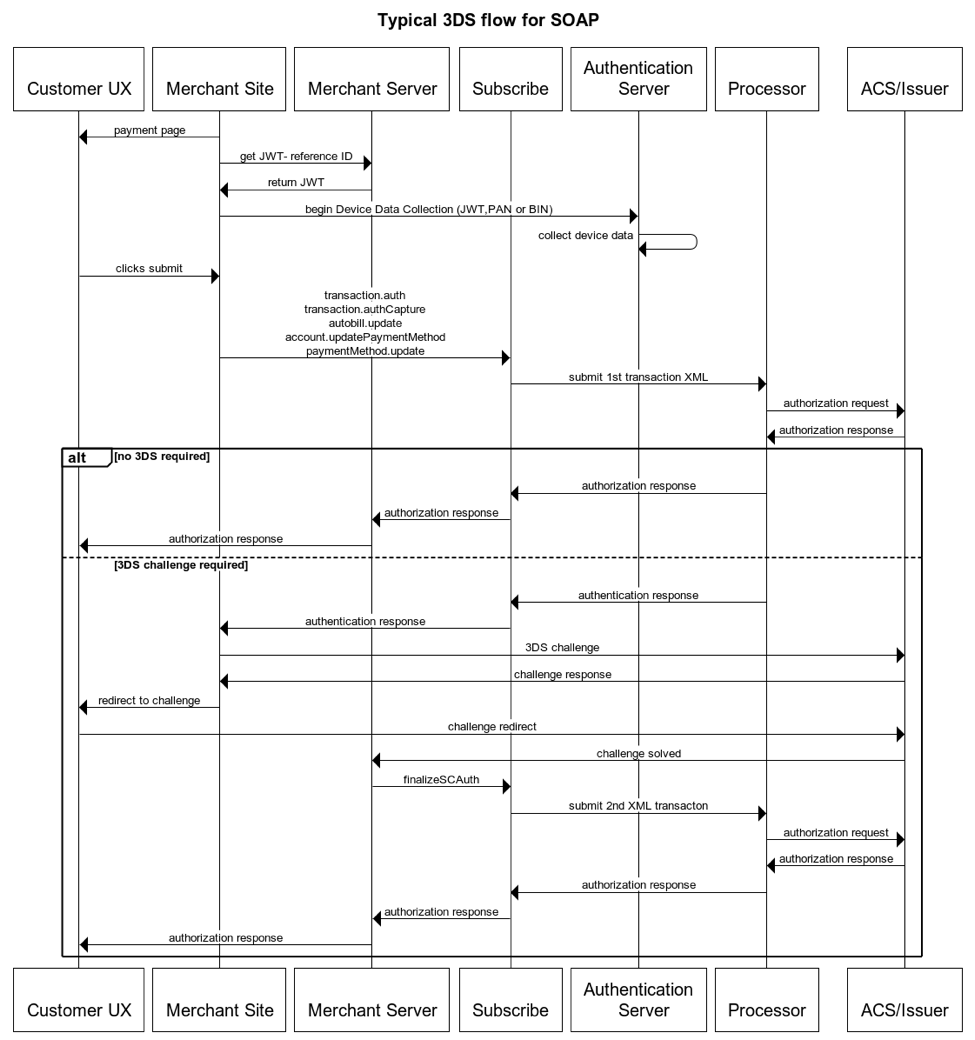
  • Alter the commerce flow by implementing Device Data Collection in the customer’s browser (sometimes also referred to as fingerprinting). Use Vindicia’s PMT implementation for REST or HOA for SOAP.
  • Query for 3DS availability for the Credit Card BIN (or Full PAN if available) used in the purchase. Not all cards are eligible for 3DS.
  • Invoke the Vindicia API to create a Transaction or Subscription. These APIs have been modified to support passing new, 3DS-specific fields, including the reference to the device information that was collected in the previous BIN lookup steps.
  • Check the API response to see if the issuing bank has required a 3DS challenge for this purchase:
    • If a challenge is required, the returned information includes a redirect URL from the issuing bank, and the merchant site is required to handle the redirect of the customer to authenticate their identity. Based on the result, either continue or require a different payment method for the purchase.
    • If there is no challenge, the authorization proceeds as usual (generally termed a frictionless purchase).
  • In the case of a 3DS challenge and successful authentication of the customer, you must call a new API method, transaction.finalizeSCAuth, in SOAP or finish Transaction in REST to continue the authorization process.

What Vindicia changed for the 3DS Process?

Vindicia has extended its Transaction and Subscription endpoints in both its REST and SOAP APIs to support the 3DS flow. During the authorization process, you can pass any previously collected 3DS-related data elements into Subscribe, which then passes them to the payment provider in the correct data elements. Subscribe passes back any challenge information in the transaction return object. If there is a challenge, the transaction is placed in a state of AuthorizationPending while the challenge is completed between the customer and their issuing bank. Once the challenge is completed by the customer, you must use a new API call in Subscribe API, transaction.finalizeSCAuth() for SOAP or finish Transaction for REST, to finalize the pending transaction. This allows the authorization process to continue and progresses the transaction status into its final state. New Data Elements In addition to the API changes, Vindicia has also added support for new data elements. In the SOAP API, Payment Method object was enhaced to support Extended Verification: PaymentMethod->ExtendedVerification In the REST API, the Credit Card Payment Method was enhanced to support Extended Verification and the Extended Verification Response, which is used for the challenge response that requires merchants to redirect the customer to a URL. In addition to the above-fixed elements, Name Value Pairs may be used to pass risk-mitigation details to the issuing bank.

Using REST and PMT?

If you are a merchant using REST and Payment Method Tokenization (PMT), depending on the authentication provider, you may be able to enable and perform 3DS Device Data Collection via the PMT process. In this case, the DFReferenceId element will be present on the payment method object after it is tokenized. You can pass this DFReferenceId to Subscribe in subsequent API calls that trigger a credit card authorization. In other cases, you must use the PMT process to tokenize the card in Subscribe, with or without validation, but with no 3DS involvement and you must use the card BIN, which is exposed on the masked credit card account number, to initiate 3DS Device Data Collection. You will pass the resulting DFReferenceId to Subscribe in subsequent API calls. When 3DS results in an authentication challenge which the customer passes successfully, use the finish Transaction call to complete the flow. If you are using REST, you do not need to upgrade to a newer version of the API.

Using SOAP and Hosted Fields?

If your purchase flow uses a PaymentMethod_update or Account_updatePaymentMethod HOA method to vault the card before you attempt to authorize a transaction, you can continue to use that flow and then use the exposed BIN to initiate BIN lookup and proceed with the transaction or subscription creation using 3DS. If you are using the SOAP API, you need to upgrade to the latest version of the SOAP API (versions 27.0 or later) or upgrade to REST. If your purchase flow uses Hosted Fields (HOA) to secure transmit credit card information directly to Vindicia, in most cases where Device Data Collection is required, you may enable 3DS in the Hosted Fields process. In this case, Subscribe will initiate the Device Data Collection and will then pass the DFReferenceId in the HOA method that is being initiated. Here is an example of setting the useCardinal3DS in Hosted Fields options: var vinOptions = { // Options formId: “mainForm”, // dom element of form vindiciaAuthId: “XXXXXXXXXXXXXXXXXXXXXXXXXX”, vindiciaServer: ”<?php print VINDICIA_SERVER; ?>”, vindiciaPostServer: ”<?php print VINDICIA_SERVER; ?>”, useCardinal3ds: true, useCardinalStaging: true, Parent topic:What You Need to Know About 3DS