
Vindicia Retain Implementation
To staff the Vindicia Retain implementation, you can use either your in-house personnel or external resources provided by Vindicia. If you choose Vindicia resources, they will implement the required code modifications in coordination with your internal team. The implementation must be thoroughly tested. To ensure a smooth transition into production, Vindicia recommends that you deliver the code modifications into a standard QA sequence before releasing to production.Billing Run Output
At the end of a batch billing run, you report to Vindicia Retain all transactions that have failed your final internal retry attempts. The SOAP reporting API call isSelect.billTransactions(), which allows you to send a batch of transactions to Vindicia.
Vindicia will work with your team to identify the appropriate point in the batch flow to report these transactions, either directly within the flow or as part of a simple standalone batch job that runs at the end of a billing run. In either case, the process generates a list of transactions and makes a SOAP call to report the transactions to Vindicia Retain. For efficiency, group the transactions into batches of hundreds or thousands per SOAP call.
Vindicia Processing
Upon receipt, Vindicia stores the transactions in the Vindicia database. For each transaction, Vindicia Retain makes one or more attempts to successfully process the transaction.Partial Authorization
When Vindicia Retain processes the transaction, it can receive a partial authorization. This occurs typically with a credit card near the credit limit or a debit card or gift card that is nearly out of funds. Vindicia combines the partial authorization data with additional data gleaned from digital commerce analysis to determine an appropriate course of action. These actions can include:- Accept the partial value available.
- Obtain the full value of the transaction, regardless of the partial amount available.
- Decline to process the transaction.
Vindicia Returns
All transaction results are stored in the Vindicia database. Your team (or Vindicia) must write a small batch job to run within your environment to collect the results of the transactions you previously submitted toSelect.billTransactions(). This process uses Select.fetchBillingResults() to retrieve information about transactions that have changed status since the input timestamp.
For each transaction that is successfully processed, the batch job must update your system to indicate that the subscriber was successfully billed and can remain entitled to the service. If the transaction is processed as a partial authorization, you can send a notification to the subscriber announcing that they have received an instant discount, or similar marketing message. If the transaction fails, the subscriber must be disentitled. Your system can send a notification to the subscriber indicating that billing was unsuccessful, and ask the subscriber to resubscribe. Regardless of the scenario, updates and notifications are handled using existing methods within your merchant billing system.
Sequence Diagram
The following diagram shows the workflow for submitting transactions to Vindicia Retain and fetching the results.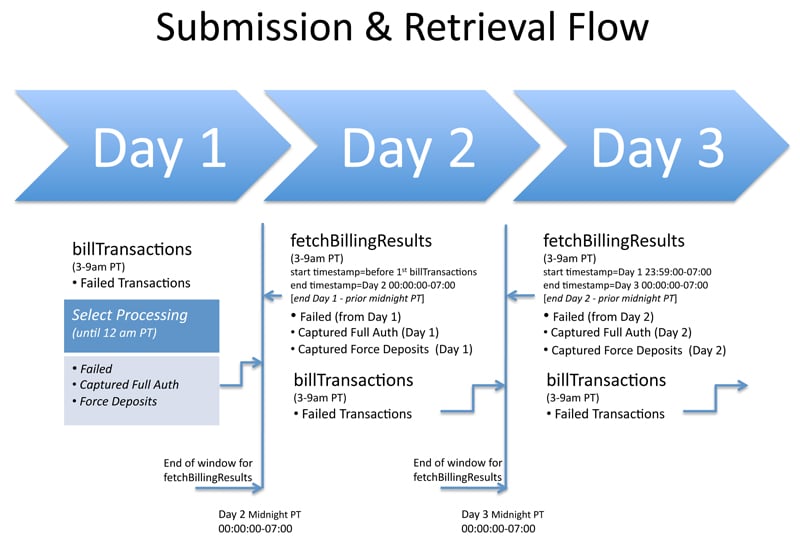
Testing
Either your team or Vindicia can lead appropriate testing of the two technical interfaces described here. The implementation must be tested to ensure that it works fully with the rest of your infrastructure. Your team must plan the testing with Vindicia to enter an appropriate release cycle and go through a full test suite within your normal release process. Vindicia can provide documented test cases and data preparation to facilitate this testing.Additional Design Considerations
Additional design considerations are addressed during implementation. Some examples include race conditions and entitlement handling during retries, as described in the following sections.Race Conditions
In some cases, a subscriber may update their card information at the same moment that Vindicia Retain is processing the subscriber’s payment. In this situation, the subscriber is billed twice: once on the existing card, and once on the new card. As a result, if a subscriber provides you with updated payment method information after you submit a transaction to Retain, Vindicia recommends that you callRefund.Transactions ().
In this case, if the transaction was already successfully processed, Vindicia issues the necessary refund of the duplicate transaction. And if the transaction was not yet processed, Vindicia Retain cancels the pending retry to ensure that the customer is not billed twice.