> ## Documentation Index
> Fetch the complete documentation index at: https://docs.vindicia.com/llms.txt
> Use this file to discover all available pages before exploring further.
# Generate a Backup Code in Vindicia IDP 2.0 Console
A backup code (BUC) is temporary one-time code used for account validation when a user's two-factor authentication is not available and the user therefore can't complete their authentication during the MFA process.
A backup code (BUC) is needed when the user's 2 Factor Authentication (2FA) method isn't accessible. The BUC helps when the user can't complete their authentication during the MFA process. Such as:
* When the user exceeds the maximum allowed number of 2FA attempts.
* When all previously generated BUCs have been utilized.
* In cases where the user cannot access their authenticator app due to technical issues.
* If the user has lost their device, such as their phone or tablet.
You can generate a one-time backup code (BUC) on behalf of a user. The user must have at least one factor registered for two-factor authentication (2FA) in order to generate a BUC for them.
**Note:** This code should be read out to the user on the phone or a secure method and should not be sent over a notification channel.
1.
Sign in to Vindicia IDP Console 2.0 by clicking **Manage Users** Link in the Vindicia Portal under your account avatar.
The User Management screen appears.
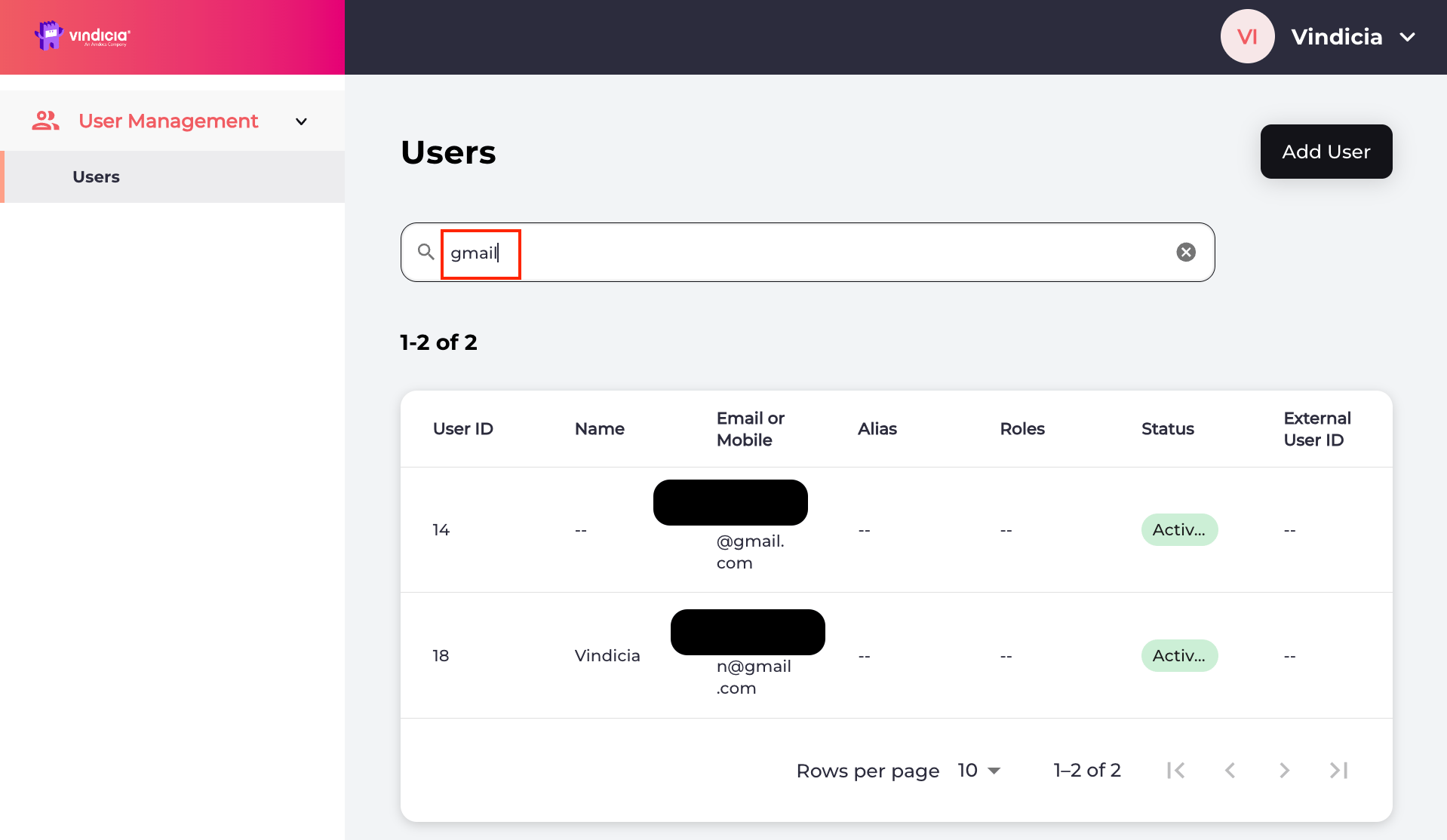 2.
[Search for the relevant user](adminSearchUser) or select the user from the list.
The selected user's **Identity** page opens.
3. Generate a backup code by selecting the **Actions** > **Generate a backup code for 2FA** link located in the top-right corner.
2.
[Search for the relevant user](adminSearchUser) or select the user from the list.
The selected user's **Identity** page opens.
3. Generate a backup code by selecting the **Actions** > **Generate a backup code for 2FA** link located in the top-right corner.
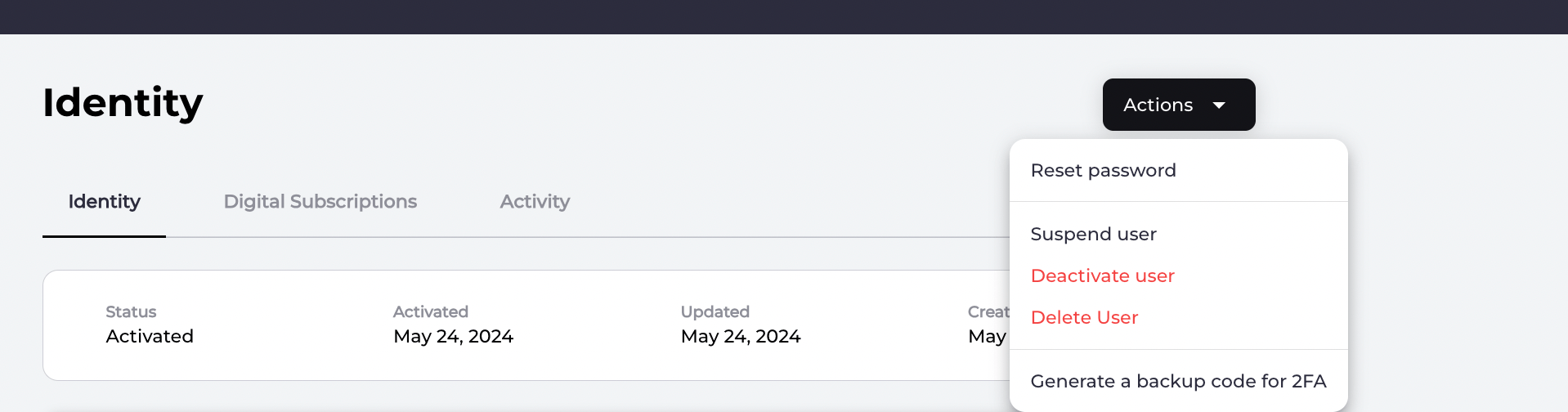 The system generates a one-time backup code (BUC) that is supplied to the user in a secure way. The user enters the BUC, authenticates, and regains access to their account.
After the user completes a successful authentication and regains access to their account again, they should perform the following tasks:
* Register a new 2FA method to ensure secure account validation in the future.
* Remove any outdated 2FA factors that are no longer functional.
* Generate a fresh set of backup codes for future use.
**Parent topic:**[Vindicia IDP 2.0 Console User Management Capabilities](../topics/userManagement2Capabilites)
This documentation is built and hosted on [Mintlify](https://mintlify.com), a developer documentation platform.
The system generates a one-time backup code (BUC) that is supplied to the user in a secure way. The user enters the BUC, authenticates, and regains access to their account.
After the user completes a successful authentication and regains access to their account again, they should perform the following tasks:
* Register a new 2FA method to ensure secure account validation in the future.
* Remove any outdated 2FA factors that are no longer functional.
* Generate a fresh set of backup codes for future use.
**Parent topic:**[Vindicia IDP 2.0 Console User Management Capabilities](../topics/userManagement2Capabilites)
This documentation is built and hosted on [Mintlify](https://mintlify.com), a developer documentation platform.