> ## Documentation Index
> Fetch the complete documentation index at: https://docs.vindicia.com/llms.txt
> Use this file to discover all available pages before exploring further.
# Upload Chargebacks To Retain
Upload chargebacks to Vindicia Retain so that Vindicia can monitor your chargeback rate and match Vindicia Retain transactions to subscriber chargebacks.
* **Use Case**: 5-6-02
* **Completed By**: Software Developer
* **Estimated Completion Time**: \<5 days
## Basic Scenario
A chargeback data feed is available through various payment processors and allows merchants and vendors to use payment provider reporting data in an automated manner for direct uploading into a database or other application. Retain uses the chargeback data received for monitoring & in the decision process.
Retain supports two models for uploading of chargeback information, directly from your payment processor (where supported) or via an automated file feed.
To enable the direct load method, where available, you will work with your Vindicia representative and your payment processor to make the necessary configurations changes in their respective systems.
To enable the automated file feed you will need to retrieve the chargeback information from your payment processor, transform that information into required file format and forward the chargeback file to Vindicia for upload.
## Design Approach
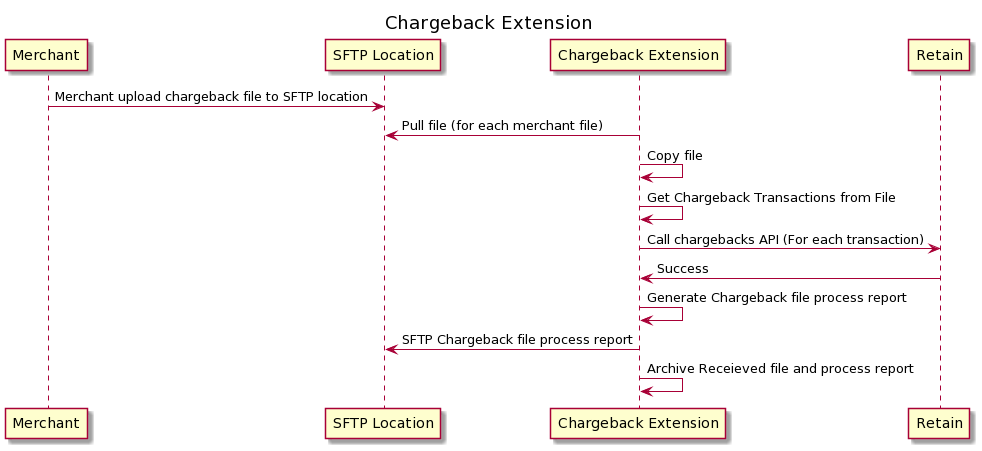
* Merchant extracts data from their Payment Processors Portal or via API.
* Merchant puts extracted chargeback data in the pre-defined format provided by Vindicia.
* Merchant puts Chargeback Extract File on the Vindicia SFTP server.
* Vindicia Retain processes the Chargeback Extract File.
* Create the ‘Chargeback Load Processing Report’ and make it available to the Merchant on the Vindicia SFTP server (stored for 60 days post processing).
* Merchant can download the ‘Chargeback Load Processing Report’ to confirm the chargebacks that were processed into the Vindicia Retain system, and which ones were rejected/did not load.
 ## Input File Naming Convention
* Delimiter will be configurable, and default will be ‘,’
* It will be `.csv` file.
* **INPUT File Name**: `CHARGEBACK___<1>.csv`
* `.done` . The "`done`" has the same file name as the chargeback file but with an extension of done and indicates the the merchant has completed loading the file to the SFTP site.
* If multiple files, then will assume numbering convention: `CHARGEBACK___<2>.csv`
## Input File Format
The following table contains information that describes the format for the file containing the chargebacks to be uploaded.
| Field | Description | Required |
| - | - | - |
| **Transactions ID** | `merchantTransactionId` of the transaction in Retain for which chargeback should be entered. | Yes |
| **User ID** | `merchantAccountId` of the account associated with the transaction. | No |
| **Amount** | Amount of chargeback (not to exceed total transaction amount). | Yes |
| **Reason Code** | Processor provided reason code for chargeback (e.g. code `4863` indicates the card holder does not recognize the charge). | No |
| **Case Number** | Processor specified case number. | No |
| **Reference Number** | Processor specified reference number. | No |
| **Merchant Number** | Merchant's ID at processor. | No |
| **Transaction DateTime** | Specify transaction date in `yyyy-mm-dd` format. | No |
| **Processor Received DateTime** | Specify a date in `yyyy-mm-dd` format | No |
| **Posted DateTime** | Specify a date in `yyyy-mm-dd` format | No |
| **Status Changed DateTime** | Specify a date in `yyyy-mm-dd` format | No |
| **Chargeback Status** | Specify one of the supported statuses, such as '`New`', '`Won`', '`Lost`'. | No |
| **Note** | Optional note. | No |
| **Currency** | Alphabetic currency code for the currency in which the transaction was conducted. | Yes |
| **Presentment Amount** | Use the same amount as the amount on the transaction. | No |
| **Presentment Currency** | Alphabetic currency code for the currency in which the transaction was conducted. | No |
## Output File Naming Convention
* **OUTPUT File Name**: `CHARGEBACK___<1>_Processed_.csv`
* If multiple files, then will assume numbering convention: `CHARGEBACK___<2>_Processed_.csv`
## Output File Format
The following table contains information that describes the format for the file containing the chargebacks to be uploaded.
| Field | Description |
| - | - |
| **Transaction ID** | `merchantTransactionId` of the transaction in Retain for which chargeback should be entered. |
| **User ID** | `merchantAccountId` of the account associated with the transaction. |
| **Amount** | Amount of chargeback (not to exceed total transaction amount). |
| **Reason Code** | Processor provided reason code for chargeback (e.g. code `4863` indicates card holder does not recognize the charge). |
| **Case Number** | Processor specified case number. |
| **Reference Number** | Processor specified reference number. |
| **Merchant Number** | Merchant's ID at processor. |
| **Transaction DateTime** | Specify transaction date in `yyyy-mm-dd` format. |
| **Processor Received DateTime** | Specify a date in `yyyy-mm-dd` format |
| **Posted DateTime** | Specify a date in `yyyy-mm-dd` format |
| **Status Changed DateTime** | Specify a date in `yyyy-mm-dd` format |
| **Chargeback Status** | Specify one of the supported statuses, such as '`New`', '`Won`', '`Lost`'. |
| **Note** | Optional note. |
| **Currency** | Alphabetic currency code for the currency in which transaction was conducted. |
| **Presentment Amount** | Use the same amount as the amount on the transaction. |
| **Presentment Currency** | Alphabetic currency code for the currency in which transaction was conducted. |
| **Processed** | (Yes/No) |
| **Processed Failure Reason** | Contains a description of the reason the given chargeback could not be uploaded. |
**Parent topic:**[Retain Use Cases](../topics/r_useCases)
This documentation is built and hosted on [Mintlify](https://mintlify.com), a developer documentation platform.
## Input File Naming Convention
* Delimiter will be configurable, and default will be ‘,’
* It will be `.csv` file.
* **INPUT File Name**: `CHARGEBACK___<1>.csv`
* `.done` . The "`done`" has the same file name as the chargeback file but with an extension of done and indicates the the merchant has completed loading the file to the SFTP site.
* If multiple files, then will assume numbering convention: `CHARGEBACK___<2>.csv`
## Input File Format
The following table contains information that describes the format for the file containing the chargebacks to be uploaded.
| Field | Description | Required |
| - | - | - |
| **Transactions ID** | `merchantTransactionId` of the transaction in Retain for which chargeback should be entered. | Yes |
| **User ID** | `merchantAccountId` of the account associated with the transaction. | No |
| **Amount** | Amount of chargeback (not to exceed total transaction amount). | Yes |
| **Reason Code** | Processor provided reason code for chargeback (e.g. code `4863` indicates the card holder does not recognize the charge). | No |
| **Case Number** | Processor specified case number. | No |
| **Reference Number** | Processor specified reference number. | No |
| **Merchant Number** | Merchant's ID at processor. | No |
| **Transaction DateTime** | Specify transaction date in `yyyy-mm-dd` format. | No |
| **Processor Received DateTime** | Specify a date in `yyyy-mm-dd` format | No |
| **Posted DateTime** | Specify a date in `yyyy-mm-dd` format | No |
| **Status Changed DateTime** | Specify a date in `yyyy-mm-dd` format | No |
| **Chargeback Status** | Specify one of the supported statuses, such as '`New`', '`Won`', '`Lost`'. | No |
| **Note** | Optional note. | No |
| **Currency** | Alphabetic currency code for the currency in which the transaction was conducted. | Yes |
| **Presentment Amount** | Use the same amount as the amount on the transaction. | No |
| **Presentment Currency** | Alphabetic currency code for the currency in which the transaction was conducted. | No |
## Output File Naming Convention
* **OUTPUT File Name**: `CHARGEBACK___<1>_Processed_.csv`
* If multiple files, then will assume numbering convention: `CHARGEBACK___<2>_Processed_.csv`
## Output File Format
The following table contains information that describes the format for the file containing the chargebacks to be uploaded.
| Field | Description |
| - | - |
| **Transaction ID** | `merchantTransactionId` of the transaction in Retain for which chargeback should be entered. |
| **User ID** | `merchantAccountId` of the account associated with the transaction. |
| **Amount** | Amount of chargeback (not to exceed total transaction amount). |
| **Reason Code** | Processor provided reason code for chargeback (e.g. code `4863` indicates card holder does not recognize the charge). |
| **Case Number** | Processor specified case number. |
| **Reference Number** | Processor specified reference number. |
| **Merchant Number** | Merchant's ID at processor. |
| **Transaction DateTime** | Specify transaction date in `yyyy-mm-dd` format. |
| **Processor Received DateTime** | Specify a date in `yyyy-mm-dd` format |
| **Posted DateTime** | Specify a date in `yyyy-mm-dd` format |
| **Status Changed DateTime** | Specify a date in `yyyy-mm-dd` format |
| **Chargeback Status** | Specify one of the supported statuses, such as '`New`', '`Won`', '`Lost`'. |
| **Note** | Optional note. |
| **Currency** | Alphabetic currency code for the currency in which transaction was conducted. |
| **Presentment Amount** | Use the same amount as the amount on the transaction. |
| **Presentment Currency** | Alphabetic currency code for the currency in which transaction was conducted. |
| **Processed** | (Yes/No) |
| **Processed Failure Reason** | Contains a description of the reason the given chargeback could not be uploaded. |
**Parent topic:**[Retain Use Cases](../topics/r_useCases)
This documentation is built and hosted on [Mintlify](https://mintlify.com), a developer documentation platform.