> ## Documentation Index
> Fetch the complete documentation index at: https://docs.vindicia.com/llms.txt
> Use this file to discover all available pages before exploring further.
# View Submission History and System Validation Error Files
Transactions submitted to Retain, undergo an asynchronous post-submission system review to detect errors. This process can take up to an hour to process and may contain errors concerning:
* Transaction submission duplicates
* Transaction hashing and encryption
* Payment method tokenization
Access the **Submission History** screen an hour after API batch submission or file upload to check the submitted Transactions' status.
If errors were detected, download the CSV file for the details and resolution recommendations. Transactions that were marked as errors were not accepted by Retain and need to be re-submitted for additional processing, if needed.
**Note:** API submitted Transactions are grouped by day and include all the API batches you submitted in that day (by UTC time zone). The Retain error file updates after each batch, wait an hour after the last batch to get the most updated error file.
**Before you begin**
* Ensure that at least one Transaction batch has been submitted.
To verify if any post-submission errors were detected by Retain, do the following:
1. [Log in to the Vindicia Retain Hub](portalAccessingVindiciaIDP) at [https://portal.vindicia.com/portal/login](https://portal.vindicia.com/portal/login)
2. From the top menu, select **Transactions** > **Submission History**.
The Retain Submission History page appears.
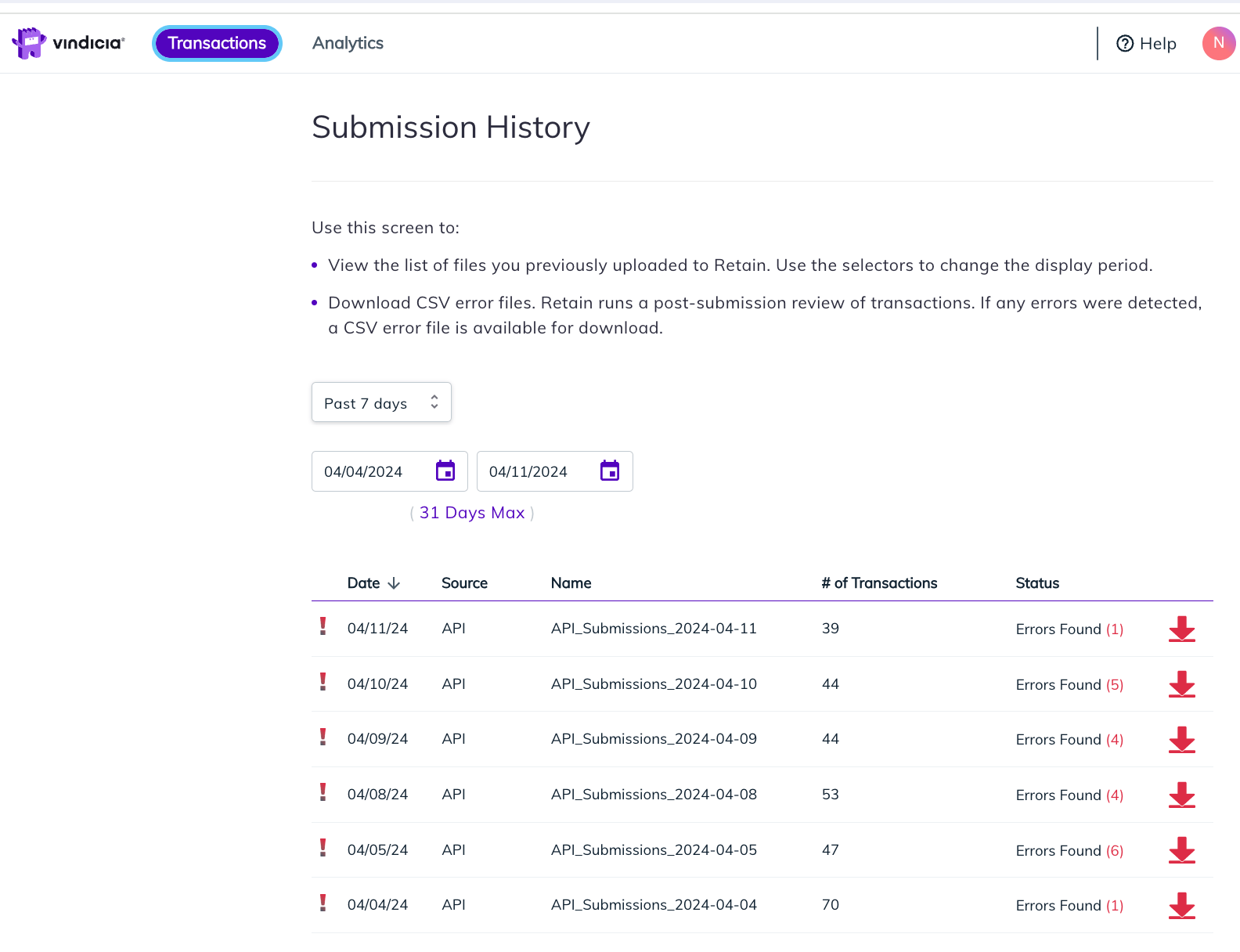 3. Filter the dates to see the list of error files for the submitted Transactions in your merchant account. You can use the pre-defined options such as **Past 7 days** and **Past 30 days**. Otherwise, select custom dates and enter your required display period.
The list of files in the table is updated according to the defined dates with Status **Errors Found (# of Transactions with detected errors)**.
| Field | Guidance |
| - | - |
| **Date** | The API Transaction submission date using MM/DD/YY format. The date is defined as per UTC time zone. |
| **Source** | The interface used to submit Transaction to Retain such as API, File upload etc. |
| **File Name** | A name given to the Retain CSV error file, which includes the relevant date. |
| **# of Transactions** | The total number of Transactions submitted to Retain on the specific date. |
| **Status** | The status of the Transactions.Available options: - Errors Found - The API batches on the specific day included Transactions for which errors were detected as part of Retain system validation. Transactions with detected errors were not accepted by Retain. |
| **Action buttons** | **Download** - Use this button to download a CSV file listing the errors and other details. For more details about the CSV error file, refer to [Retain Transaction Submission Errors](retainErrorList). |
4. Click the **Download** icon
3. Filter the dates to see the list of error files for the submitted Transactions in your merchant account. You can use the pre-defined options such as **Past 7 days** and **Past 30 days**. Otherwise, select custom dates and enter your required display period.
The list of files in the table is updated according to the defined dates with Status **Errors Found (# of Transactions with detected errors)**.
| Field | Guidance |
| - | - |
| **Date** | The API Transaction submission date using MM/DD/YY format. The date is defined as per UTC time zone. |
| **Source** | The interface used to submit Transaction to Retain such as API, File upload etc. |
| **File Name** | A name given to the Retain CSV error file, which includes the relevant date. |
| **# of Transactions** | The total number of Transactions submitted to Retain on the specific date. |
| **Status** | The status of the Transactions.Available options: - Errors Found - The API batches on the specific day included Transactions for which errors were detected as part of Retain system validation. Transactions with detected errors were not accepted by Retain. |
| **Action buttons** | **Download** - Use this button to download a CSV file listing the errors and other details. For more details about the CSV error file, refer to [Retain Transaction Submission Errors](retainErrorList). |
4. Click the **Download** icon  .
The Retain error CSV file is downloaded locally to your device.
5. Open the CSV file with a spreadsheet application to see the Transactions that were not accepted by Retain as well as the relevant error code and description.
The following details appear per Transaction (row).
* **api\_request\_id**: The API batch identifier that is included in your POST request for the specific Transaction in question. This same identifier may be relevant for several rows, if several Transactions from the same batch had errors detected.
* **id**: The unique Transaction ID you submitted, allowing you to identify the specific Transaction.
* **error**: The error code and description, identifying the problem that was encountered for the specific Transaction.
* **recommendations**: Additional info explaining the problem and suggesting resolution steps.
For resolution steps and more details, continue to [Retain Transaction Submission Errors](retainErrorList).
**Parent topic:**[Retain Transactions](../topics/retainTransactions)
**Related information**
[Retain Transaction Submission Errors](retainErrorList)
This documentation is built and hosted on [Mintlify](https://mintlify.com), a developer documentation platform.
.
The Retain error CSV file is downloaded locally to your device.
5. Open the CSV file with a spreadsheet application to see the Transactions that were not accepted by Retain as well as the relevant error code and description.
The following details appear per Transaction (row).
* **api\_request\_id**: The API batch identifier that is included in your POST request for the specific Transaction in question. This same identifier may be relevant for several rows, if several Transactions from the same batch had errors detected.
* **id**: The unique Transaction ID you submitted, allowing you to identify the specific Transaction.
* **error**: The error code and description, identifying the problem that was encountered for the specific Transaction.
* **recommendations**: Additional info explaining the problem and suggesting resolution steps.
For resolution steps and more details, continue to [Retain Transaction Submission Errors](retainErrorList).
**Parent topic:**[Retain Transactions](../topics/retainTransactions)
**Related information**
[Retain Transaction Submission Errors](retainErrorList)
This documentation is built and hosted on [Mintlify](https://mintlify.com), a developer documentation platform.